How It Works
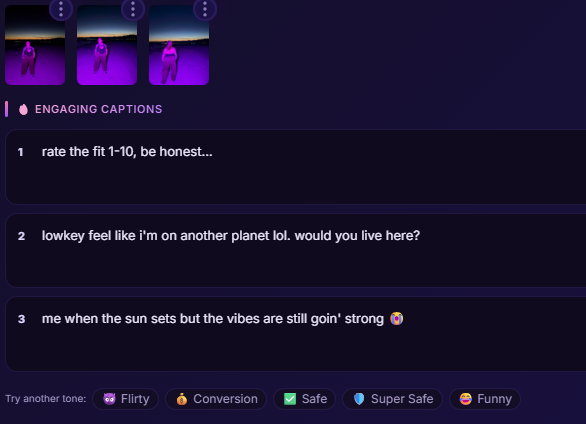
The AI Caption Generator looks at your actual media (image or video) and writes captions that match what it sees. These aren't generic templates — the AI describes your specific content.
6 Caption Tones
Choose a tone that fits your posting strategy:
- Engaging — Maximum engagement. Questions, hot takes, "rate 1-10" formats that drive comments.
- Flirty — Double meanings and innuendo that still pass TOS. The kind where the comments are all the eye emoji.
- Conversion — Creates curiosity and FOMO without being salesy. "You're not ready for the full thing" energy.
- Safe — Clean lifestyle vibes. Makes any content look like a fashion or daily vlog post.
- Super Safe — Ultra wholesome. Perfect for content that's pushing platform limits — the caption frames it as fitness, fashion, or self-care.
- Funny — Actually funny. Self-deprecating, absurdist humour. Think tweets that go viral.
How to Use
- Create a post and add at least one image or video
- Below the text editor, you'll see the AI Captions tone buttons
- Click a tone to generate 3 captions
- Click any caption to insert it into your post
- Try a different tone if you want more options
Good to Know
- Captions are TOS-compliant by design — they'll never mention adult platforms or use explicit language
- Each caption is under 150 characters for maximum impact
- The AI writes like a real person, not a copywriter — casual, authentic, sometimes messy
- No hashtags are included (add your own if you want them)